The access point pretending to be yours
Your router can tell you who is connected to it. Nothing in your Mac tells you when something else starts claiming to be your network. That is the gap Airward Pro closes.
21 August 2026
Every other check on your network has a fallback. Curious what is connected? Your router’s admin page lists it. Wondering about open ports? There are tools for that.
But nothing on your Mac notices when a second access point starts broadcasting your network’s name — and that is precisely the attack worth noticing, because it needs no password and leaves no trace on your router at all.
What Airward Pro is watching
A new access point claiming your network
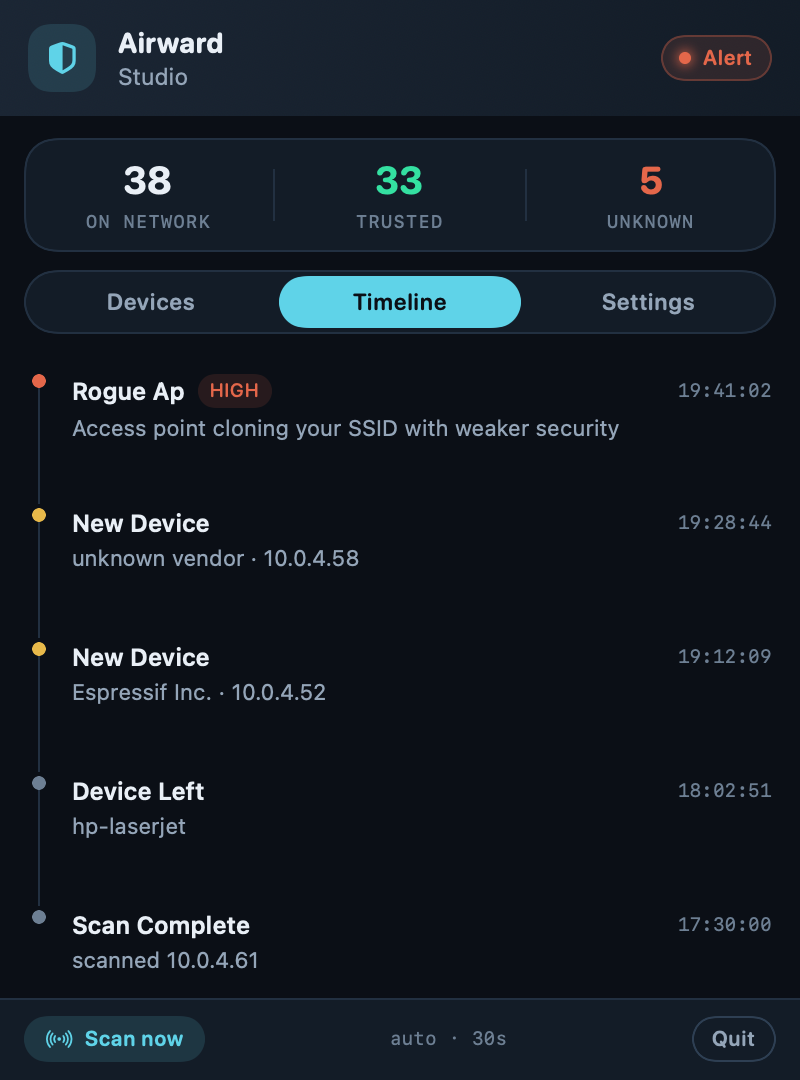
Airward remembers the access points that serve each network you use — not by name, but by BSSID, the hardware address of the access point itself. Names can be copied in seconds; hardware addresses are the thing worth tracking. When a BSSID you have never seen starts advertising a network you know, Airward tells you.
Security getting weaker
A clone of your WPA2 network that is suddenly open is about as clear a signal as this gets. Legitimate networks do not get less secure. Airward compares the security of every access point offering your SSID against the one you are actually on, and escalates when something is offering less.
Instability that suggests a push
Repeated disconnects and reassociation can be ordinary interference — or an attempt to knock you off your real access point so you land on a different one. Airward tracks association patterns and flags the shape of it.
Quiet is a feature
Any office, café or mesh network broadcasts one name from a dozen access points — that is how roaming works. A detector that alerts on each of them is unusable by lunchtime, and a tool people mute protects nobody.
So Airward baselines. The first time it sees a network, it records the access points serving it and stays silent. From then on it alerts only on what appears afterwards — which is exactly what an impostor does, by definition. You lose no detection and you get your attention back.
Everything ends up in the timeline
Detections are not just a notification you might miss. Every join, scan and anomaly lands in an event timeline you can scroll back through — useful when you want to answer “when did that start?” rather than “what is happening right now”.
What we will not claim
Airward tells you that something is impersonating your network. It does not decrypt traffic and does not “stop eavesdroppers” — modern Wi-Fi is already encrypted over the air, so there is nothing to stop at that layer. The useful job is knowing before you trust the network, and that is the job it does. The full explanation.
It is in Pro
Wi-Fi attack detection, alerts and the event timeline are Airward Pro — €39.99 once, three Macs, no subscription. The device inventory is free forever.