Meet Airward
Your network is busier than you think. Airward puts all of it one click away in the menu bar — named, sorted, and watched.
21 August 2026
Open your menu bar. There it is: every device on your Wi-Fi, live. Not a list you have to run a scan to produce, and not a page you have to remember to visit. Just there, current, whenever you glance at it.
A typical home network runs 40 to 70 devices once you count lightbulbs, speakers, thermostats and TVs. Most people can name about a dozen of them.
It names things for you
Airward does the identification work before you see the list. Each device arrives with its vendor, a guess at what kind of thing it is, its IP, and the ports it has open. “Apple, Inc.” and “Tp-Link Technologies” beats a column of hex addresses, and it means the list is readable on the first run rather than after an afternoon of detective work.
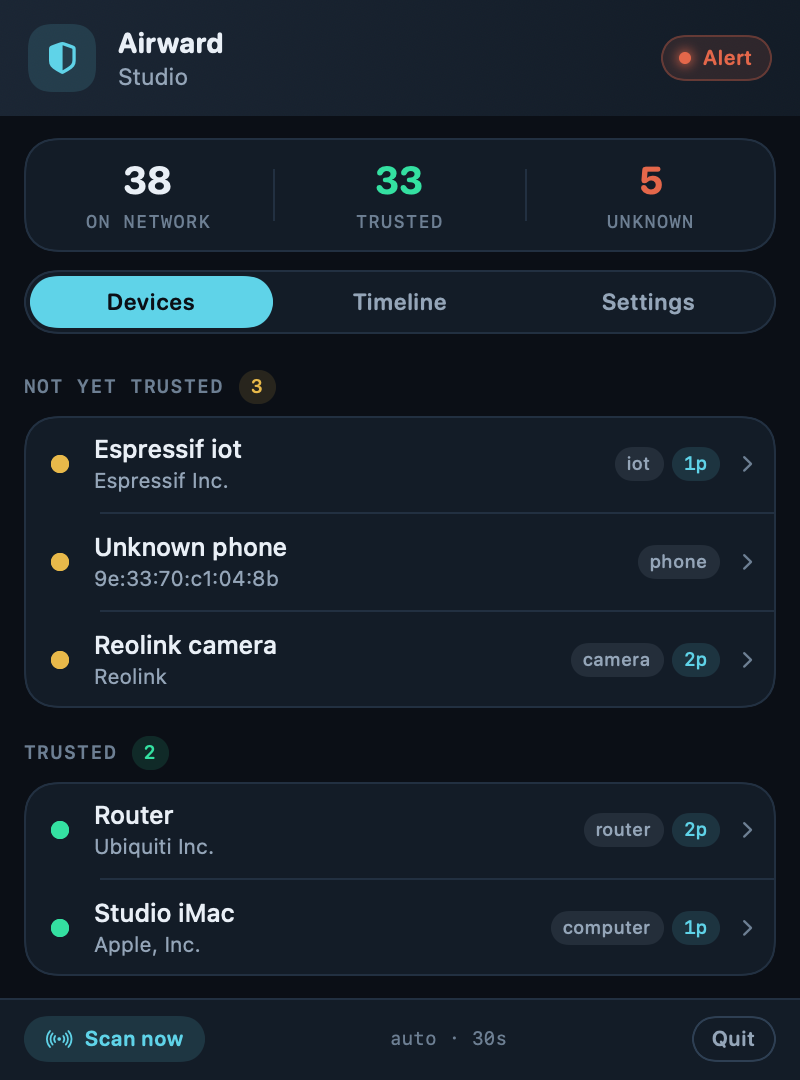
You teach it once
Tap any device to give it a name and an owner and mark it trusted — “Maya’s iPad”, “kitchen speaker”, “the printer nobody uses”. From then on Airward stops mentioning it. The point is not the first list; it is shrinking the unknown pile until what remains actually means something.
Then it watches
This is the part a scanner cannot do. Airward keeps running, and when something you have not accounted for joins your network, you get a native notification — not a badge you might notice next Tuesday.
It is quiet by design. The first time it sees your network it records what is there and says nothing, because everything is new on day one and eighty notifications is not security, it is noise. After that, it tells you about arrivals.
And it watches the airwaves too
Airward Pro also pays attention to the access points around you. If something starts broadcasting your network’s name that was not there before, you hear about it — that is the evil-twin signal, and it is the one thing on this list you cannot check by looking at your router’s admin page. How that attack works.
Everything stays on your Mac
No account. No cloud. No telemetry. Your device inventory lives in a database on your own machine, and we run no servers that receive it — not as a policy we could quietly revise, but as an architecture. There is nothing built to collect it.
It also runs unprivileged: no admin password, no kernel extension, nothing installed deep in the system. The full detail.
Try the free tier
The complete device inventory — discovery, naming, labelling, on-demand rescan — is free and stays free. Alerts, history and Wi-Fi attack detection are Pro, a one-time €39.99 for three Macs, with no subscription.